SAT Draft
SAT means Software Assisted Translation.
An SAT Draft is a draft recording made by a computer, not by a person. It is a first try at translating a section into your language.
SAT Drafts are not available to every translation team that uses Render. If you and your translation team are interested in using SAT Drafts, please contact the FCBH Oral Bible Translation department at renderrequests@fcbhmail.org.
You find the SAT Draft on the Draft Record screen.
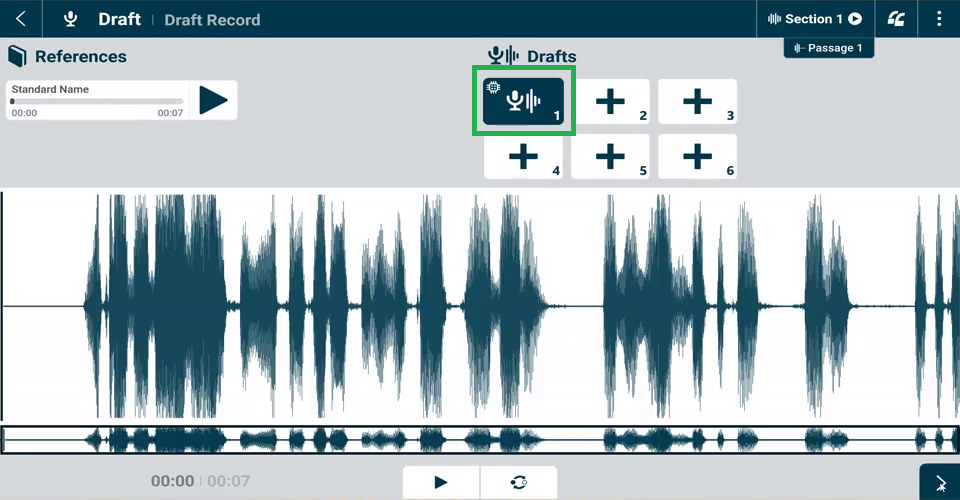
It is always in the first draft tile. It has a special icon.
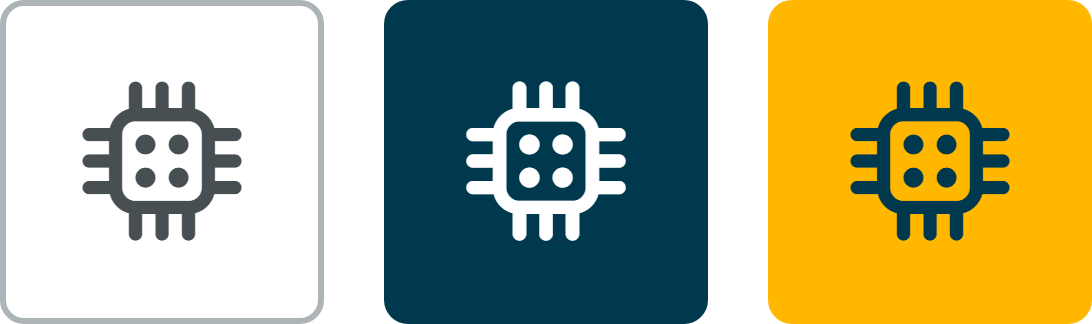
The icon shows that a computer made this draft.
The SAT Draft is only a starting point. You are still the translator. Your team decides what the final draft will be.
Where do SAT Drafts come from?
FCBH is testing new computer tools to help translation teams work faster. SAT Drafts are one of these tools.
The computer learns from your team’s own work. It listens to books that your team has already finished and approved. That is how it learns your language. It needs at least one approved book, sometimes more. Only then can it make a first draft for a new book.
This is how an SAT Draft comes to your project:
- A computer program outside Render makes a draft recording for a section.
- The program sends the recording to Render’s online system.
- When your computer syncs online, Render downloads the SAT Draft.
- The SAT Draft appears on the Draft Record screen for that section.
How will I see it in my project?
If SAT Drafting is turned on by FCBH for your project, and the SAT Drafts have been generated by the computer for the book you are working on, you will see them as described below:
On the Draft Record screen, look for these things:
- A draft is already in draft tile 1. You did not record it. It has the SAT icon.
- An Edit button on the drafts. In projects with SAT Drafts, you can edit drafts on the Draft Record screen.
- Your own recordings go in draft tiles 2 to 6.
You may not see an SAT Draft if:
- You are on the wrong version of Render. SAT Draft is only available in Render versions 3.13.3 and later.
- All 6 draft tiles already have your team’s recordings.
- Your team divided the passage after the SAT Draft arrived.
- The computer has not made an SAT Draft for that section yet.
What should I do with an SAT Draft?
Treat the SAT Draft like a helper’s first try. A computer made it, so it can have mistakes.
- Follow your normal process for exegesis and internalization for each passage.
- Listen to the SAT Draft only after your team has internalized the passage.
- Discuss as a team what you learned from the SAT Draft.
- Draft your own version of the passage in the remaining draft tiles.
- Choose your best draft on the Draft Select screen, as usual.
Watch this video.
After the Draft stage, everything works the same as before. Your section still goes through all your other workflow stages, for example Peer Check, Community Test and Consultant Check. The SAT Draft does not skip any checks.
Good to know:
- You cannot delete the SAT Draft. Draft tile 1 has no Delete button. That is normal.
- There is only one SAT Draft for each section. If a new one arrives, it replaces the old one.
- If all 6 draft tiles have your recordings, the SAT Draft is hidden. Delete one of your recordings, and it comes back in draft tile 1.
- Dividing a passage removes the SAT Draft. If you divide a passage after the SAT Draft arrives, it disappears from that section.
Questions and help
We want to hear from you. Please tell us:
- if the SAT Drafts help your team, or not,
- if an SAT Draft has a big mistake,
- if something in Render does not work as this article says.
To tell us:
- Go to Submit a Ticket on the Render Helpdesk.
- Write SAT Draft at the start of your message.
- Write the project name, the book, and the section number.
- Say what happened. If you can, add a screenshot.
You can also ask your support contact.
Remember
- An SAT Draft is a draft made by a computer. It is in draft tile 1 on the Draft Record screen.
- It can have mistakes. Listen and check it carefully.
- Internalize the passage first. Then listen to the SAT Draft, discuss it, and draft your own version.
- Your team chooses the final draft. All the other checks still happen.
- Tell us what you think. Your feedback helps every team.